Processes is a screen for finding and opening processes within a Group. This article summarizes the items displayed in the list, as well as the search and Favorites specifications.
Overview
Processes displays the processes you have access to. The scope of access is determined by the "Organization-Wide Permission" and "User-Specific Permissions" set for each process.
You can switch between "All" and "Favorites" in the sidebar on the left side of the screen.
Folders are also displayed in the sidebar, and selecting a folder shows only the processes in that folder in the list.
The width of the sidebar can be changed by dragging, and the changed width will be retained on your next visit.
Specifications
Items Displayed in the List
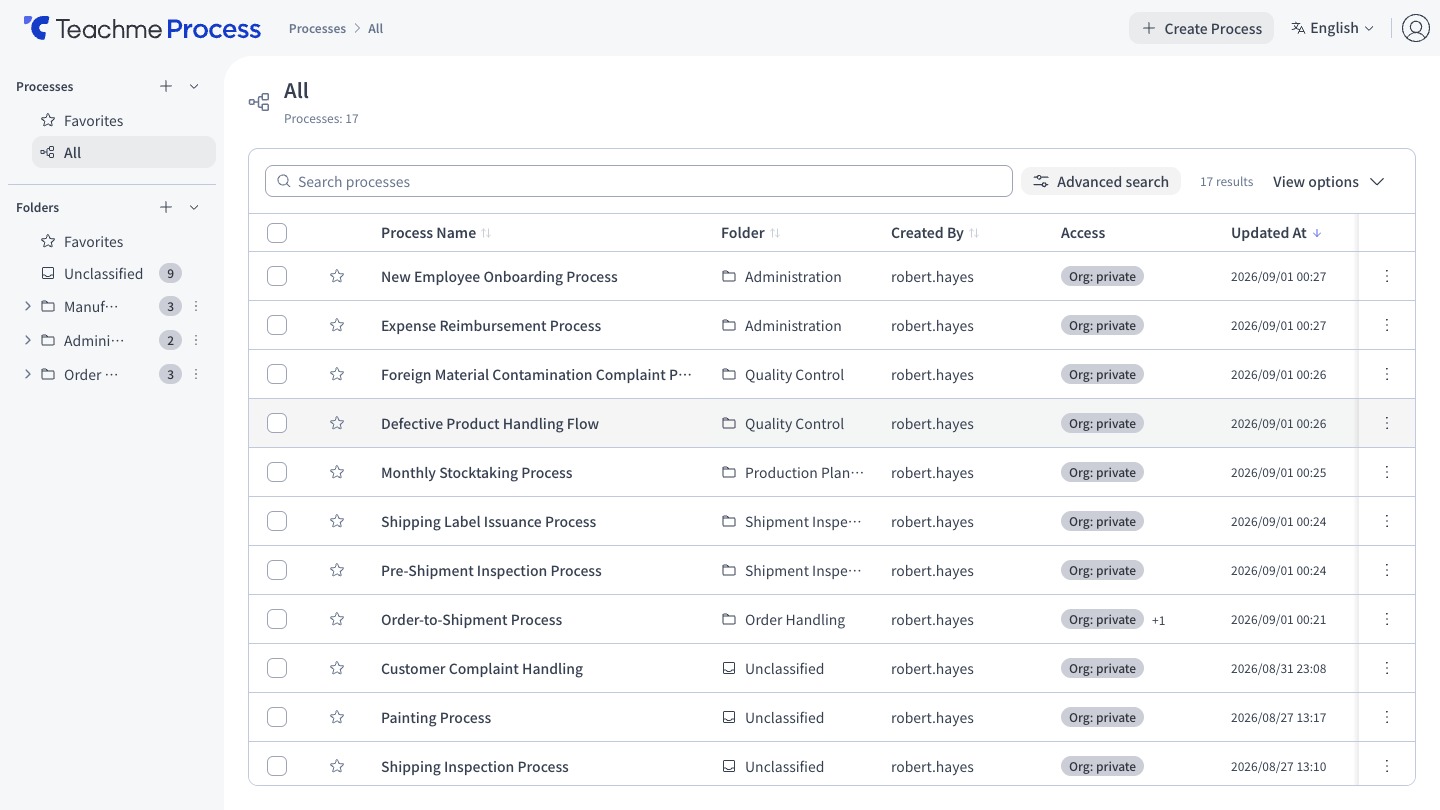
The columns are arranged from left to right as follows.
- Favorites (★)
- Process Name
- Created By
- Created At
- Updated At
- Organization-Wide Permission
- User-Specific Permissions (hovering over it displays the number of users with view and edit access respectively)
- Actions menu
The columns to display can be changed using the column display toggle in the upper right of the list.
Sort Order and Number of Items Displayed
- The default sort order is newest Updated At first
- 50 items are displayed per page
- The "Organization-Wide Permission" and "User-Specific Permissions" columns are not available for sorting
Various Limits
- Process Name: up to 100 characters
Duplicating and Deleting
- The name of a duplicated process will be "Copy of (original process name)"
- What gets duplicated is the saved content. Unsaved edits are not included
- You cannot delete a process while in edit mode. The delete button will be disabled and "Cannot delete while in edit mode" will be displayed
Favorites
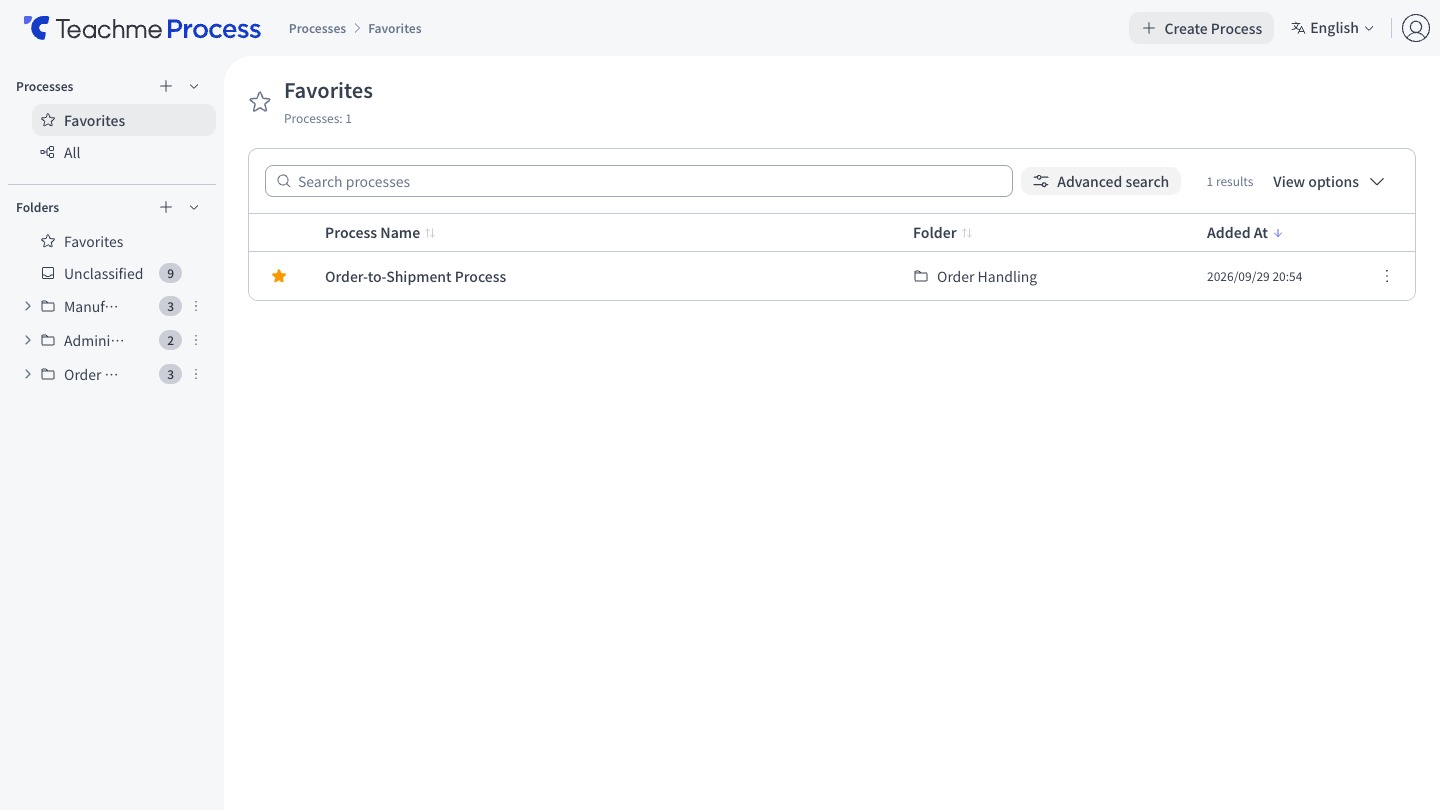
Favorites is a per-user setting. It does not affect other users' Favorites. The Favorites list is displayed in order of most recently added, and the default columns shown are "Process Name" and "Added At".
A process that is being newly created cannot be added to Favorites until it is saved.
Folders
- Folders are shared within a Group, and all users in the Group can create and modify folders
- The hierarchy can be up to 5 levels deep
- Up to 500 folders can be created at the same level
- Folder Name must be within 100 characters
- You cannot create folders with the same name at the same level
- Cannot delete a folder that contains folders or processes
- Processes that are not in any folder are displayed under "Uncategorized"
- Moving a process to a different folder requires edit permission for that process
- Folder Favorites is also a per-user setting
How to Use
View the process list and search for a process
https://teachme.jp/8/manuals/49801048
Add a process to your favourites and remove it
https://teachme.jp/8/manuals/49801173
Check your favourite processes in a list
https://teachme.jp/8/manuals/49801372
Edit a process name
https://teachme.jp/8/manuals/49801958
Copy the title and URL of a process
https://teachme.jp/8/manuals/49801636
Duplicate a process
https://teachme.jp/8/manuals/49802233
Delete a process
https://teachme.jp/8/manuals/49802356
Create a folder
https://teachme.jp/8/manuals/49826647
Rename a folder
https://teachme.jp/8/manuals/49826696
Move a folder
https://teachme.jp/8/manuals/49826725
Reorder folders
https://teachme.jp/8/manuals/49826811
Delete a folder
https://teachme.jp/8/manuals/49826841
Move processes to a different folder
https://teachme.jp/8/manuals/49826926
Manage favorite folders
https://teachme.jp/8/manuals/49826955