There is a limit to the number of processes that can be created in a Group per month.
This article explains how the count is calculated and what happens when the limit is reached.
Overview
A Group can create up to 300 processes per month.
The count is shared among all users in the Group.
Group Owners and Admins are subject to the same limit as other users.
The count resets to 0 on the 1st of each month at 0:00 (Japan Time).
Unused counts do not carry over.
Specifications
Operations that count
- When a new process is saved for the first time … 1
- When a process is duplicated (including duplication from a past version in Version History) … 1
It does not matter whether an AI Agent was used.
Operations that do not count
- Opening the Create Process screen without saving
- Editing and saving an already saved process
- Restoring a past version
Deleting a process after it has been created does not reduce the count.
The same applies when the user who created the process is deleted.
Which month is counted
The count is applied to the month in which the process is saved, not the month in which the Create Process screen was opened.
For example, if you open the Create Process screen on October 31 and save on or after November 1 at 0:00, it will count toward November.
Even if you are using the service from outside Japan, the count is based on Japan Time.
When the limit is reached
- The "Create Process" button in the header and Folder sidebar becomes unavailable.
Hovering over it displays: "The process creation limit for this month has been reached. Resets on (date) at 0:00 (Japan Time)." - Opening the URL for the Create Process screen displays "The process creation limit for this month has been reached," the reset date, and "Back to Processes" instead of the editing screen.
- The "Duplicate" option in Processes, the process header, and Version History becomes unavailable, and "This month's creation limit has been reached" is displayed below the item.
The remaining count and limit value are not displayed on screens such as Processes.
What you can still do after the limit is reached
- Working on and saving in a Create Process screen that was already open before the limit was reached
- Editing and saving already saved processes (including use of AI Agent)
- Restoring a past version
- Creating new processes and duplicating on or after 0:00 (Japan Time) on the 1st of the following month
If you save in a screen that was open before the limit was reached, that will also be counted.
As a result, the creation count for the current month may exceed the limit and be displayed as "301 / 300."
Button display and actual count
Whether "Create Process" and "Duplicate" are available is determined by the count retrieved when the screen is opened and then refreshed every minute thereafter.
Processes created by other users may not be reflected immediately.
Even if the button appears available, if the limit has been reached at the moment you open the Create Process screen or perform a duplication, a message indicating the limit has been reached will be shown and the creation or duplication will not be possible.
Checking the current month's creation count
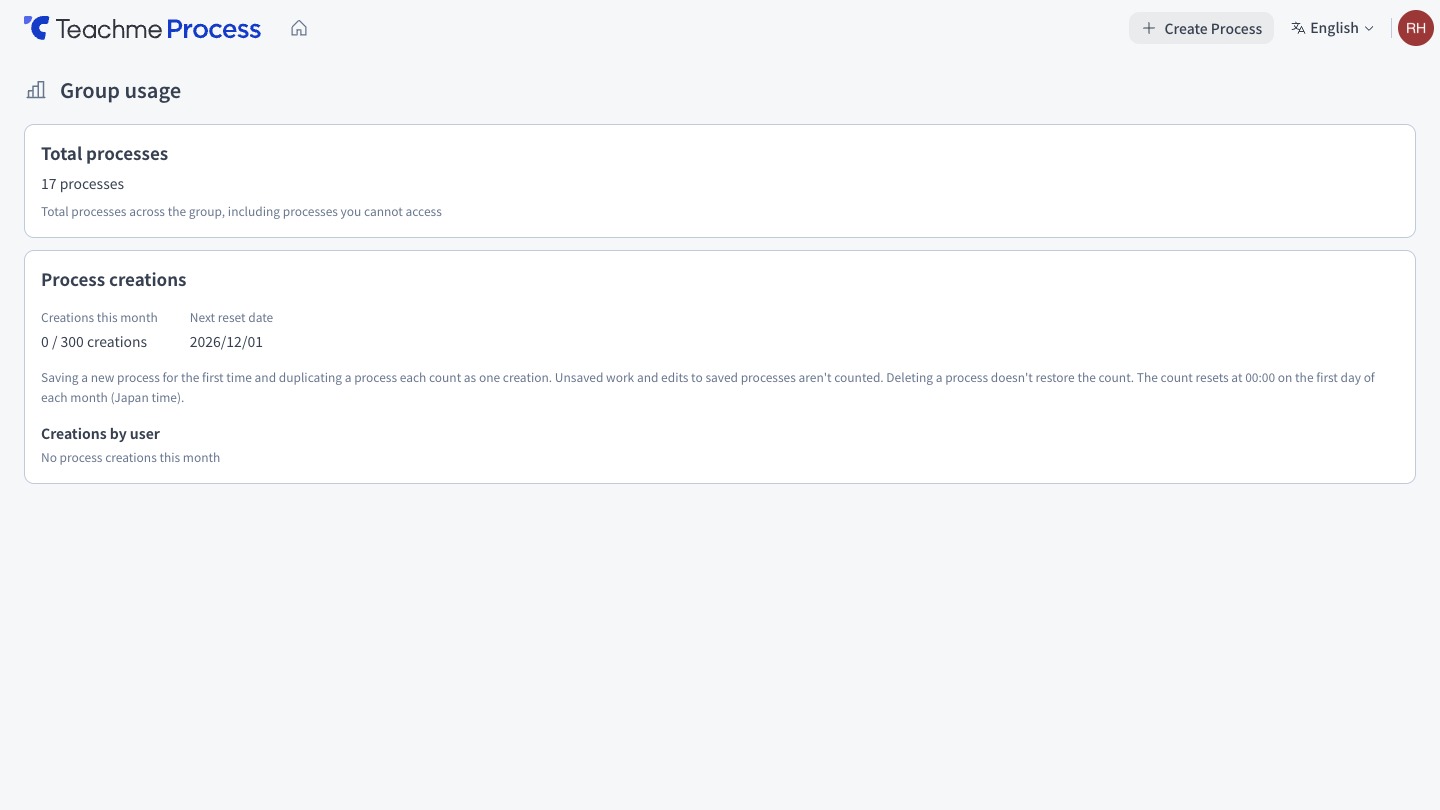
Group Owners and Admins can check the following information under "Process Creation Count" in "Group Usage Status."
The count is not displayed to other users.
- The current month's creation count and limit (e.g., 128 / 300)
- The next Reset date
- The creation count per user (in descending order).
Counts for Deleted users also remain and are shown as "Deleted."
How to
Check the total and created processes in group usage
https://teachme.jp/8/manuals/51005279
Create a new process
https://teachme.jp/8/manuals/49819757
Duplicate a process
https://teachme.jp/8/manuals/49802233
Duplicate a process from a past version
https://teachme.jp/8/manuals/49803465
Related
Tell me about creating and saving processes
https://help.process.teachme.jp/hc/en-us/articles/61437458419225
Tell me about Version History
https://help.process.teachme.jp/hc/en-us/articles/61437458725273